Case Study
Captiony
Web-based subtitle editor for fast, precise SRT/VTT authoring with timeline controls and local auto-save.
Project Overview
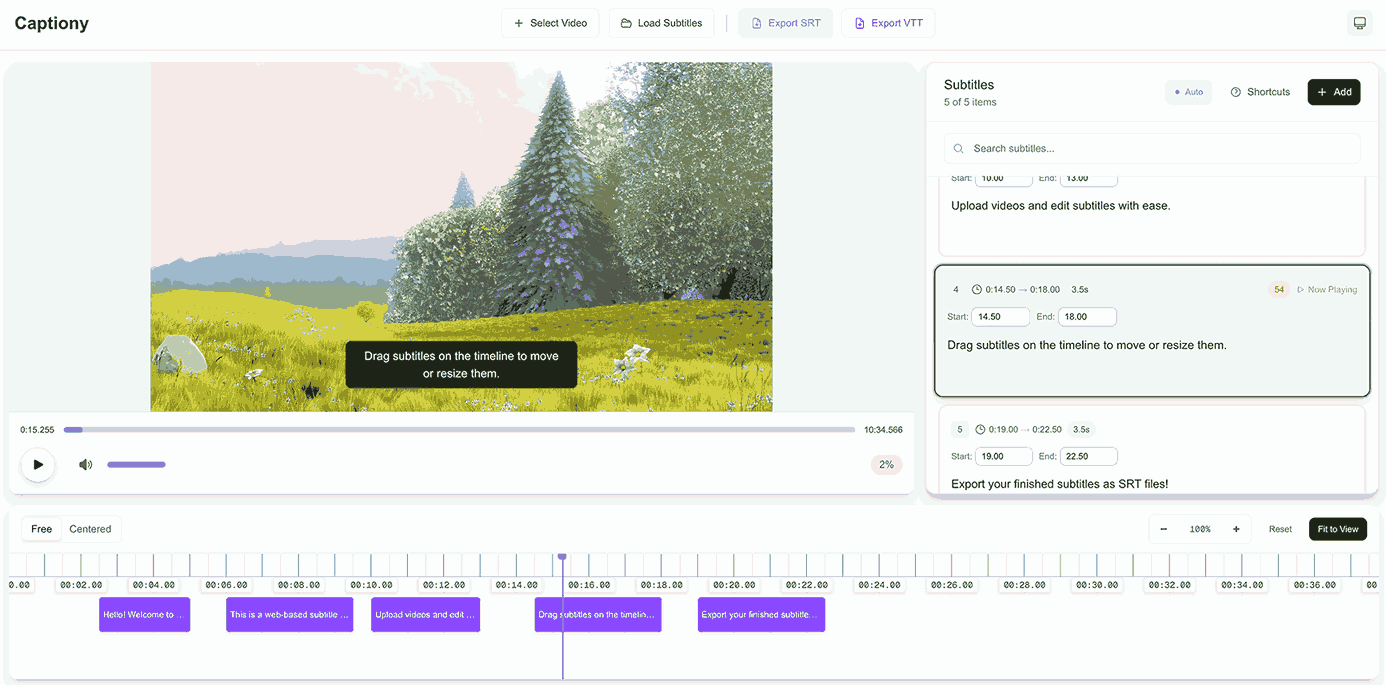
Captiony is a browser-first subtitle editor focused on usability and speed. It supports full subtitle workflows in one screen: upload a video, edit captions on a timeline, preview changes in real time, and export ready-to-use subtitle files.
Key Features
- Timeline Editing: Drag and resize subtitle bars for precise timing control
- Real-time Preview: Validate subtitle placement and timing while video plays
- Import & Export: Supports both SRT and VTT formats
- Auto-save Recovery: Persist work to localStorage to prevent accidental loss
- Keyboard-Driven Workflow: Shortcut support for faster professional editing
- Theme Support: Dark/light mode for long editing sessions
Technical Challenges & Solutions
Challenge 1: Time-accurate interaction
Built timeline interactions that keep subtitle timestamps consistent while users drag, resize, seek, and zoom.
Challenge 2: File-format reliability
Implemented strict import/export paths for SRT and VTT so edited subtitles round-trip correctly between tools.
Challenge 3: Browser-only persistence
Designed a low-friction save strategy using localStorage so users can safely resume work without backend state.
What I Learned
- Designing timeline-heavy UI for real editing scenarios
- Balancing precision controls with a clean beginner-friendly UX
- State management for media, subtitles, and timeline viewport behavior
- Building reliable browser-native file workflows without server dependency
Impact
Captiony lowers the barrier to accessible video publishing by letting creators produce subtitles quickly without installing heavy desktop tools.